Get started
Quickstart
Send one deliberately broken query to ChunkTrace and see which stage lost the answer. About five minutes, and no vector database to set up.
What you'll do#
You'll run a tiny retrieval pipeline that gives a wrong answer, send its trace to ChunkTrace, and read the diagnosis. The pipeline has one bug: top_k is too small, so the chunk that holds the answer is never retrieved.
You need Node.js 22 or newer and a GitHub account (the SDK is installed from GitHub Packages).
1. Create an account#
Open chunktrace.com/traces and choose Create an account. You need an email and a password of at least 12 characters.
A new account gets a project of its own. A project holds your traces and the API keys that can send them.
2. Create an API key#
In the dashboard, go to Settings, then Create key. Name the key, choose Full access, and create it.
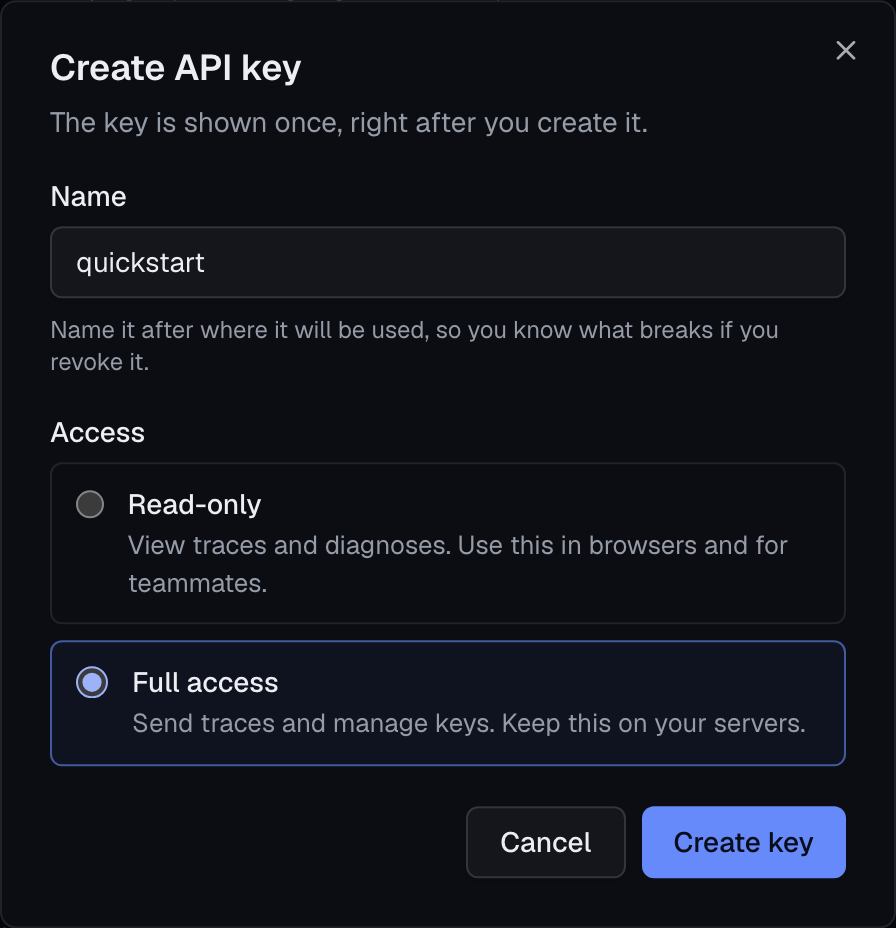
The key starts with ct_ and is shown once. Copy it now and put it in your shell:
export CHUNKTRACE_KEY=ct_your_key_here3. Install the SDK#
The SDK is published to GitHub Packages, so npm needs to know where the @chunktrace scope lives. In a new folder, create .npmrc:
@chunktrace:registry=https://npm.pkg.github.com
//npm.pkg.github.com/:_authToken=${GITHUB_TOKEN}
GITHUB_TOKEN is a GitHub personal access token with the read:packages scope. Then install:
export GITHUB_TOKEN=ghp_your_token_here
npm init -y
npm install @chunktrace/sdk
Install the SDK has more detail, including CI.
4. Send a trace#
Save this as first-trace.mjs. It uses the in-memory store that ships with the SDK, so there is nothing else to set up.
import { createProfiler, hashedBagOfWords, httpSink, memoryStore } from "@chunktrace/sdk";

// A three-chunk knowledge base. In your app this is your vector store.
const store = memoryStore({
  name: "support-docs",
  embed: hashedBagOfWords(),
  chunks: [
    { chunk_id: "faq#3", text: "How do I request a refund? Open the order and choose Request refund." },
    { chunk_id: "refund-policy#2", text: "Refund window: customers may request a full refund within 30 days of purchase." },
    { chunk_id: "shipping#1", text: "Orders ship within 2 business days." },
  ],
});

const profiler = createProfiler({
  app: { name: "quickstart" },
  sink: httpSink({
    endpoint: "https://api.chunktrace.com",
    apiKey: process.env.CHUNKTRACE_KEY,
  }),
});

const run = profiler.trace({
  query: "How many days do I have to request a refund?",
  label: { type: "keyword", values: ["30 days"] }, // what a right answer has to cite
});

// The bug: top_k is 1, and the chunk with the answer ranks second.
const hits = await run.retrieve(store, { top_k: 1, diagnose: true });
run.buildContext(hits);
await run.finish({ answer: "I don't have that information.", answer_correct: false });

console.log(run.diagnose().findings.find((f) => f.primary).message);
console.log(`trace id: ${run.trace_id}`);
Run it:
node first-trace.mjsChunk refund-policy#2 ranked 2 among eligible results; top_k=1 cut it.
trace id: tr_mwk0ppb3_unefr7The first line is the diagnosis, computed in your process. The same trace is now in your project.
5. Open the trace#
Go back to the dashboard and open Traces. Your query is the newest row. Open it.
The pipeline shows how many chunks entered and left each stage. The labeled chunk, refund-policy#2, is green until the stage that lost it.
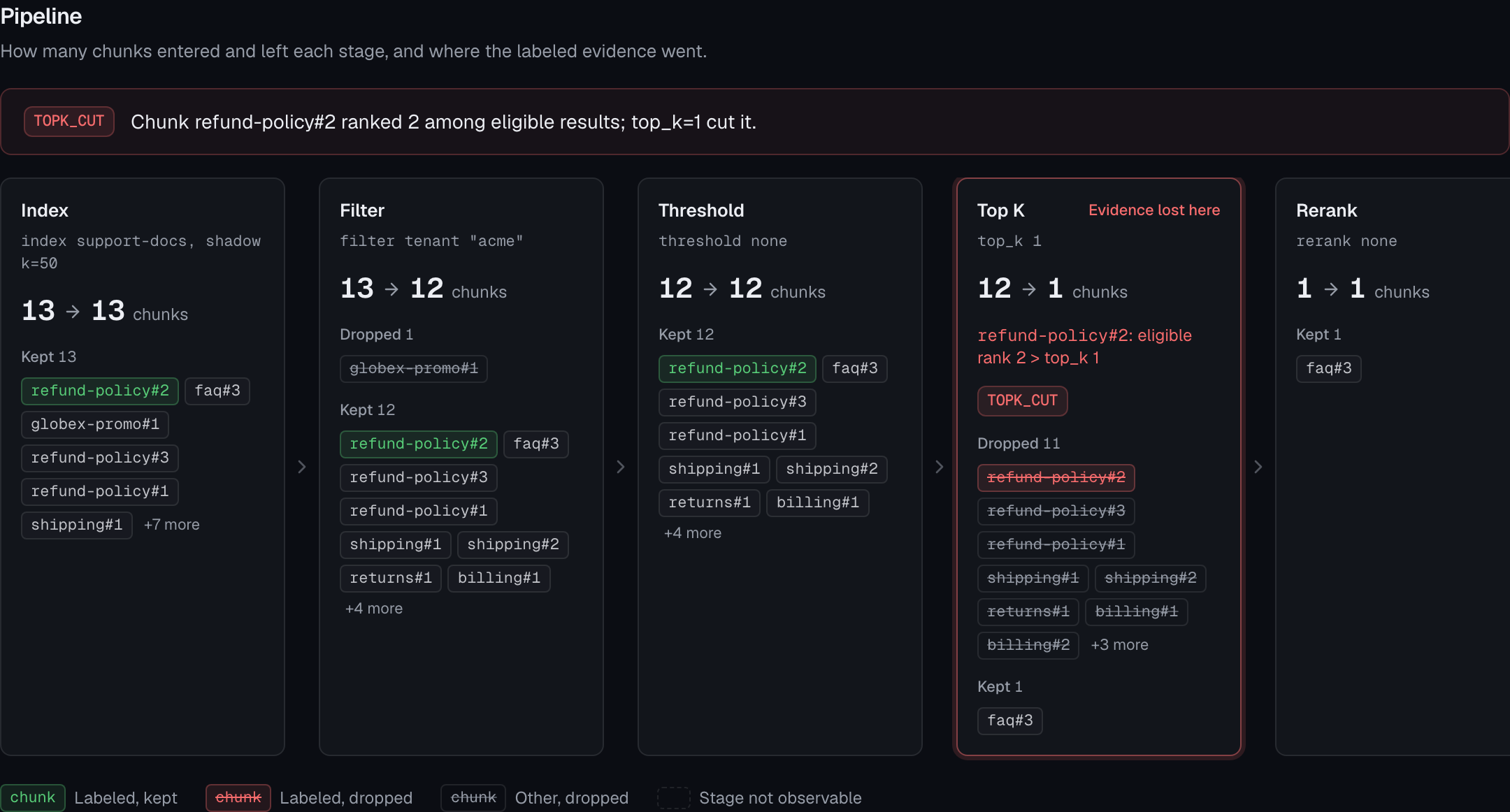
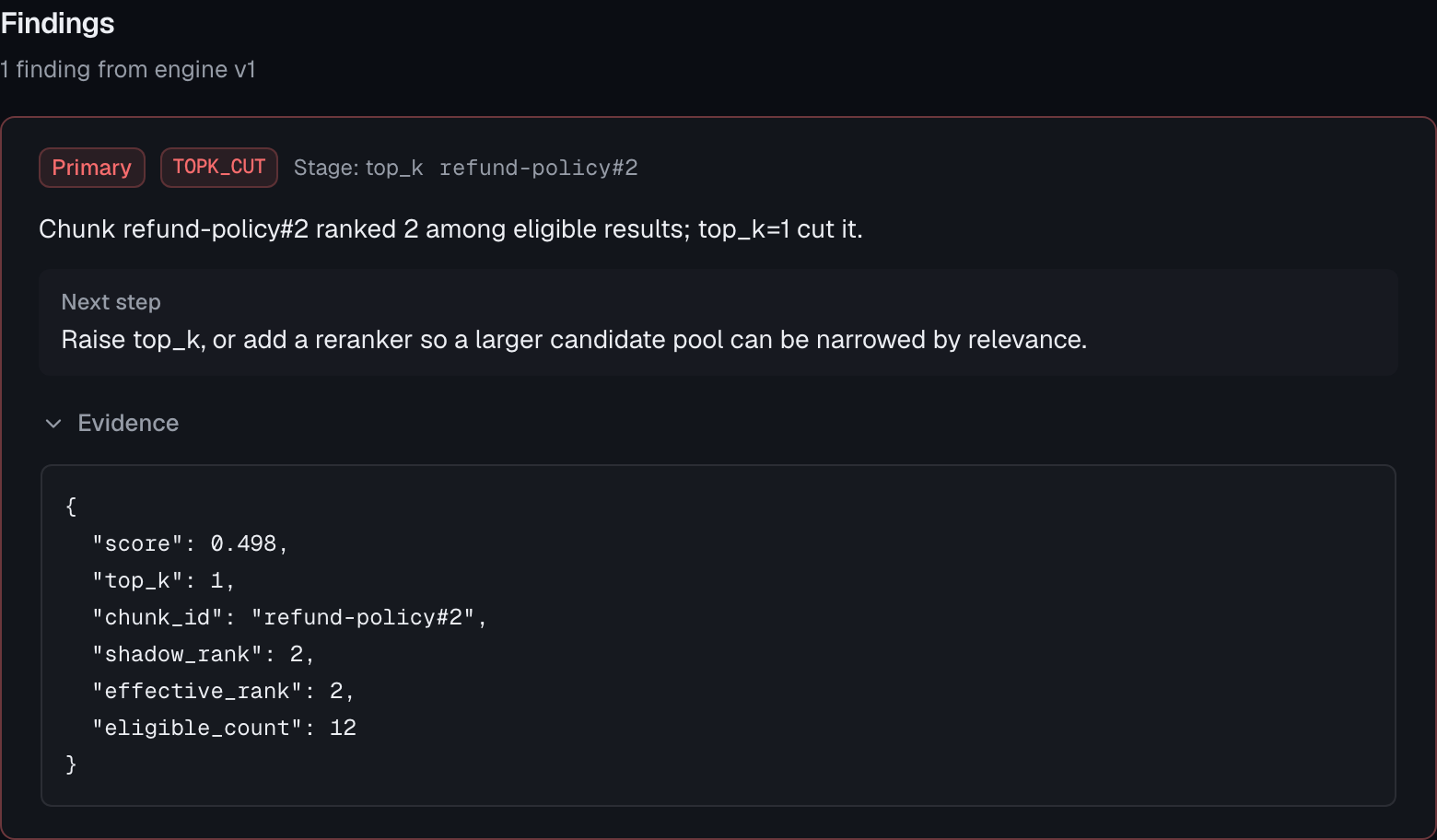
Below it, the finding says what happened, what to change, and the field values that prove it.
6. Fix it#
Change top_k to 2 and run the script again. The primary finding becomes EVIDENCE_IN_CONTEXT: the chunk reached the prompt, so retrieval is no longer the problem. (The script's answer is hard-coded, which is why it is still wrong.)
That is the whole loop: label a failing query, read the stage that lost the evidence, fix that stage.
Next steps#
- Trace a query in your own pipeline.
- Labels: how to say what a right answer should cite.
- Finding codes: the ten things a diagnosis can say.